
software
LinkDown
The best video tools are command-line programs most people will never install. LinkDown bundles yt-dlp and ffmpeg, configures them, and puts a browser button in front. Our most-starred release.

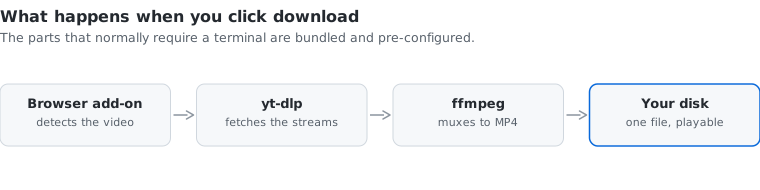
Saving a video normally means installing yt-dlp, installing ffmpeg, putting them on your PATH, and learning a flag or two. Most people give up and use an advert-riddled website instead.
LinkDown ships those tools pre-configured behind a browser add-on. You click the button on the page you are already watching and get a playable MP4.
It has more stars than everything else we have released put together.
Developed by Thomas Wu, CEO & Co-Founder. Logo by Tz-yun Hsiao. Tutorials by RunningCheese.
Platform
Windows, with a browser add-on
Output
MP4
Licence
Open source
Built with